


Every stunning video you post, requires a clean & flawless finish. Whether it is a beauty tutorial, a health advisory or a marketing promotional video, all these videos require detailed precision, flawless editing and an overall clean aesthetic.
Say you have crafted a perfect video, which you’ve worked tirelessly on, but a tiny watermark is left behind, overshadowing your masterpiece. It happens to the best of us! Unwanted texts, inaccurate captions, and blurry but evident watermarks can ruin an otherwise great video. This is where Pippit’s AI text remover comes in – your new go-to editing tool. This AI-powered tool effortlessly removes all kinds of clutter, watermarks, and text, leaving your content looking professional and polished.
Bid farewell to distractions: Benefits of removing text from videos
Removing text from videos can have a major impact on your viewer’s experience. By eliminating any and all sorts of distractions, you can compel the viewer to direct their attention on the main subject of the video. This is essential for important videos that require a high level of professionalism, such as corporate videos, product demonstrations, high-end valuables etc.
With the help of Pippit’s multiple text removal tools, you can create clean and distraction-free videos, which will create an engaging and interactive audience. Bid farewell to strange and sloppy text overlays and say hello to polished videos. By doing so, you will have,
- Enhance viewer engagement: Without any distracting text overlays, your viewers will be able to focus on your content, leading to an increased engagement and interest in your videos.
- Boost professionalism: Videos with text overlays are straight up unprofessional. AI Text Remover helps you create polished, professional looking videos that boosts your brand’s reputation and credibility.
- Amplify your message: By removing unnecessary text from your videos, you can ensure that your video communicates the key message effectively, aimed directly to your target audience, and driving results.
- Improved video quality: Additional text overlays can be heavy in size and can often lead to poor video qualities. AI Text Remover helps you remove all this clutter, resulting in clean, polished videos.
Text-free videos: What re-framing can do for you
Say for instance you shoot a video for YouTube, which naturally, is shot horizontally. You want to share the same video on your Instagram, or YouTube shorts. If you let it choose automatically, you’ll be left with strange incomplete texts going out of the frame when it adjusts to the vertical mobile frame.
Pippit’s auto reframe tool is a game-changer for problems like this. It is essential for creators and video editors who want to remove text from their videos. Equipped with AI-powered technology, this tool automatically adjusts the frame, while keeping the main subject in focus. This feature is especially useful when the text is placed near the edges of the video, allowing you to remove it without affecting any key elements. By using Pippit’s auto reframe tool, you can create clean and professional-looking videos that engage your audience.
Remove the background: Make your subject shine:
Due to the lack of professional studio spaces, and their increasingly high costs, most people have no choice than to make a video in their rooms, offices etc. This can result in a lot of distracting elements existing in the background of your videos.
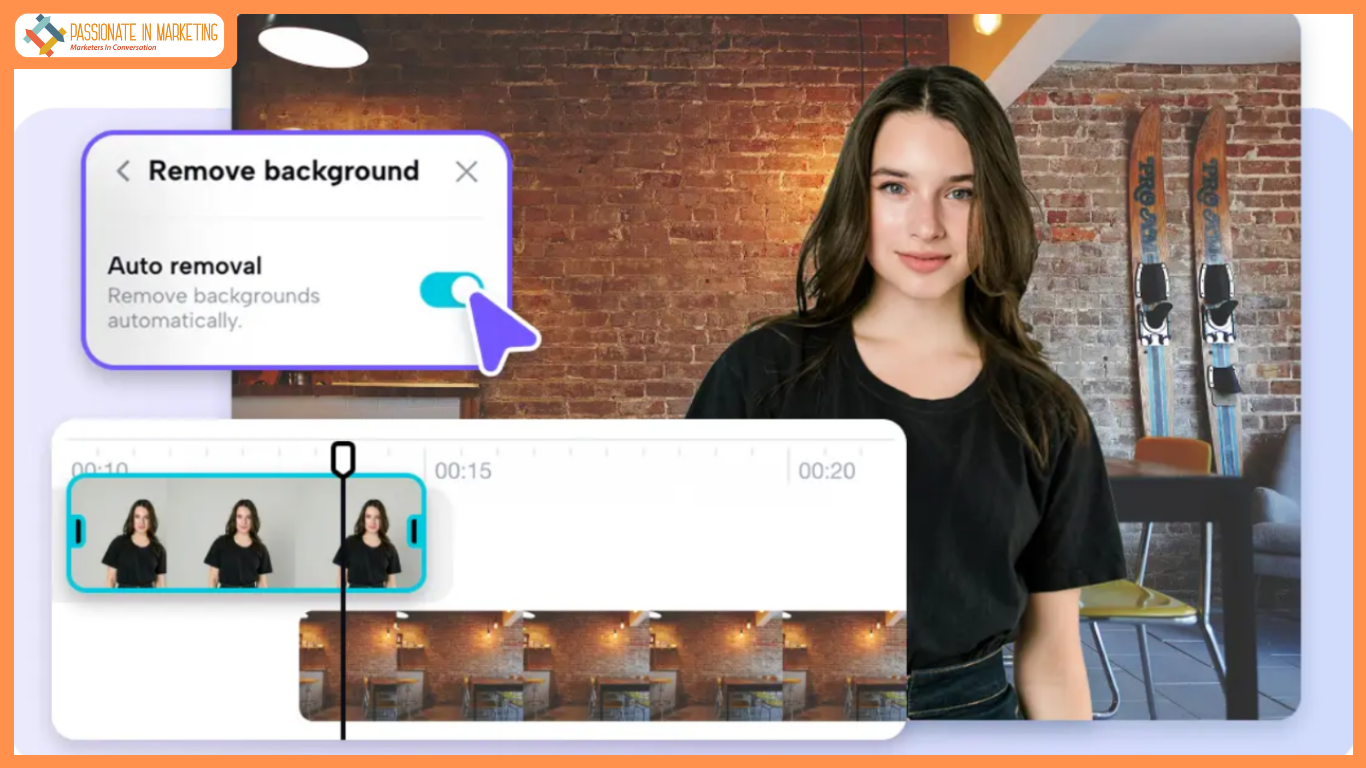
Pippit’s ‘Remove Background’ feature gives you the freedom to create stunning videos that showcase your subject in a new and exciting way. With the help of this tool, you can isolate your main subject, remove any unwanted text, and replace the background with a solid color or a video overlay. The result you achieve is a clean and professional look that’s perfect for any project. Whether you are creating fashion content for social media, a promotional advertising video, or simply entertainment, Pippit’s background removal feature is the perfect tool for the job.
Effortless background removal: In 3 simple steps
Anyone with basic knowledge about cameras, videos and editing etc. would know that removing backgrounds from your videos is no easy task. You’ll have to mask the subject accurately, make separate layers, spend hours cleaning the back ground, and only then you will get somewhere close to a clean and professional video.
Thanks to Pippit’s ‘Remove background’ feature, you can accomplish the same task in only 3 simple steps. Let’s see how!
Step 1: Upload your video content
Start by simply logging onto your Pippit account. Next, choose Video editor. Here you’ll be able drag & drop your video content easily. Otherwise, import a file directly from your PC or gallery.
Step 2: One-click background removal
Next, simply select ‘Remove background’ and toggle on ‘Auto Removal’ to erase the backdrop. You can then customize your background by selecting a solid color or layering a stock video or image from the Elements library.
Step 3: Customize & export your master-piece
Once the background layer is removes, you can try different backgrounds, colors etc. When you are happy and satisfied with your newly refined video, click ‘Export’ and you are ready to share it with the world. Here, you can download it to your device or publish it directly onto your social media platforms.
Text done right: Purpose & intent
While some text overlays can be distracting, others can be a powerful tool for engagement. While Pippit’s text removal tool helps you eliminate unnecessary text from your videos, learn about the text that enhances your content.
If you are a musician, music video creator or just a music lover, Pippit’s lyric video maker is an absolute game-changer for you. This tool lets you generate captions or subtitles for your stunning music videos, in style. This enhances your video by increasing its impact, reach, views, engagement and much more.
Masking with style: Pippit’s overlay options
Now that we have covered the text removal part of AI Text remover, lets learn about some of Pippit’s overlay options which tackle the same problem. Pippit allows you to mask the text in your videos with style. You can overlay stickers or stock images to cover up any unwanted text, or use advanced tools like freeze frame to pause the scene and cover the content correctly. This will help you add a creative touch to your videos, and make your videos more engaging. Whether you are looking to remove text or add visual interest, Pippit’s overlay options have got you covered.
From cluttered to clean: Transform your videos now
With the advancement of technology, making videos is completely different now than it was even a decade ago. Smart platforms like Pippit are here to do your job, in an extremely efficient and professional ways. Pippit offers a comprehensive suite of tools to elevate your video content. With smart features like auto-reframing, background removal, image stabilization, and speed control, you can achieve a professional look that’s clean, aesthetic and polished. Additionally, you get to explore creative options like AI avatars, facial retouching, and frame freezing to perfectly mask your text. The result? Seamless, high-quality videos that wow your audience. So go ahead, make your life fuss-free and start editing with Pippit today.
**’The opinions expressed in the article are solely the author’s and don’t reflect the opinions or beliefs of the portal’**

