


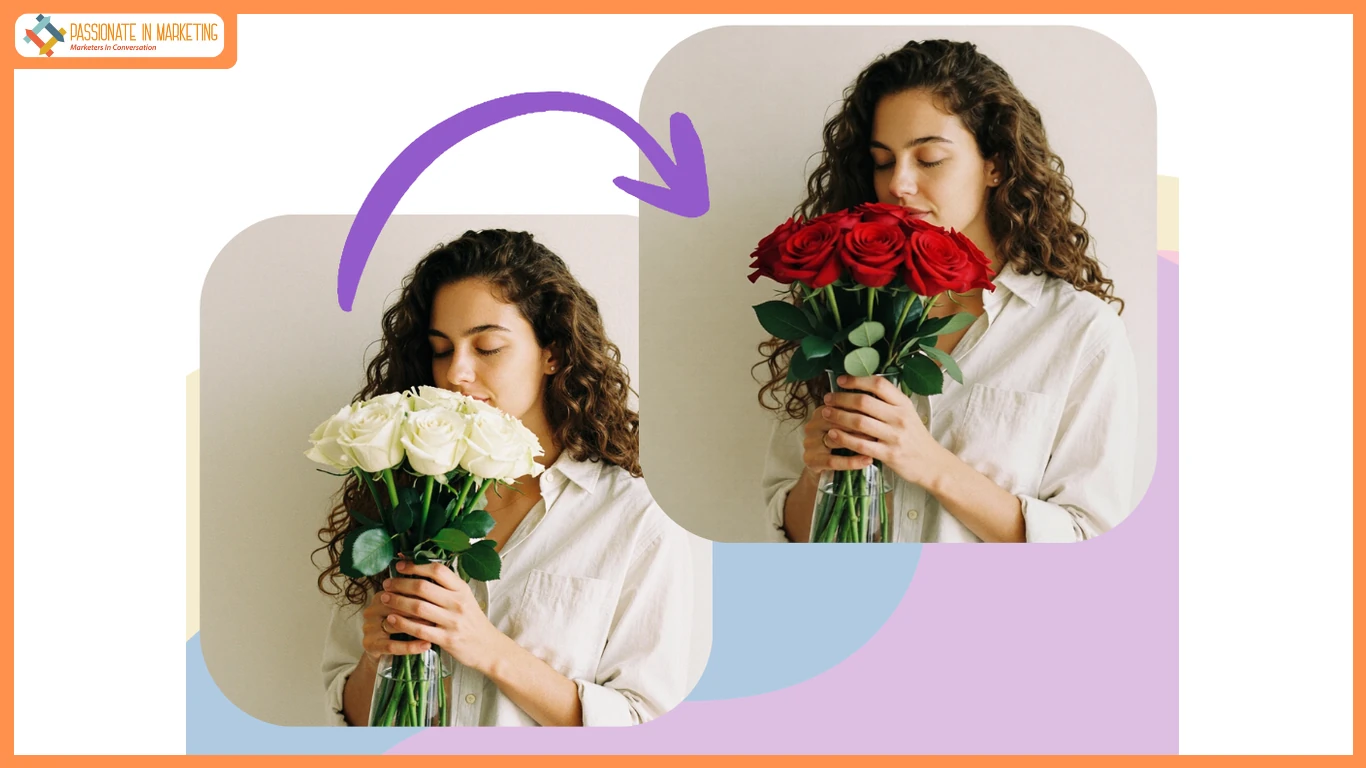
Unlocking your creative vision no longer requires expensive software or years of artistic training. Thanks to AI, you can now generate stunning images from simple text descriptions or even transform existing photos into entirely new creations. This guide explores the best free AI tools available today, helping you find the perfect one for your projects.
We’ll cover everything from simple, web-based generators to more feature-rich platforms. Whether you’re a marketer needing social media graphics, a blogger looking for unique visuals, or just a curious creative, you’ll find a tool here that fits your needs.
Top 1: PhotoEditorAI
Overview
PhotoEditorAI stands out as a powerful and user-friendly web-based tool that excels at both text-to-image and image-to-image generation. It simplifies the creative process, allowing you to produce high-quality visuals directly in your browser without any downloads. Its intuitive interface makes it an excellent starting point for anyone new to AI art. As a comprehensive Free AI Image Generator Online, it provides a robust set of features that cater to a wide range of creative demands, from simple graphics to detailed artistic pieces.
The platform is designed for speed and efficiency, delivering impressive results from text prompts in just a few seconds. Beyond creating images from scratch, its free image to image generator capability allows you to upload a picture and guide the AI to reimagine it in a new style or context. This dual functionality makes PhotoEditorAI a versatile choice for both content creators and hobbyists.
Key Features
- Text-to-Image Generation: Type a descriptive prompt and choose from various artistic styles like anime, photorealistic, fantasy, and cartoon to bring your ideas to life.
- Image-to-Image Transformation: Upload an existing image and use a text prompt to instruct the AI on how to modify it, preserving the original composition while applying new aesthetics.
- Style Variety: The tool offers a diverse selection of predefined styles, ensuring you can match the output to your project’s specific tone and feel.
- User-Friendly Interface: The entire process is streamlined. You just need to enter a prompt, select a style, and generate, making it accessible for absolute beginners.
Pros & Cons
Pros:
- Completely free to use with generous generation limits.
- No software installation required, everything runs in the browser.
- Combines text-to-image and image-to-image in one platform.
- Fast generation times produce results in seconds.
Cons:
- Lacks some of the advanced fine-tuning controls found in professional desktop software.
- Requires an internet connection to function.
Best For
PhotoEditorAI is ideal for marketers, bloggers, social media managers, and beginners who need a quick, reliable, and free tool for creating custom visuals without a steep learning curve.
Top 2: Canva AI Image Generator
Overview
Canva has long been the go-to platform for easy graphic design, and its AI Image Generator, Magic Media, seamlessly integrates into that ecosystem. It allows users to create AI-generated images directly within their Canva projects, streamlining the workflow from concept to finished design. This eliminates the need to use a separate tool and import images, saving valuable time.
Key Features
- Deep Canva Integration: Generate images and add them directly to your presentations, social media posts, or flyers within the Canva editor.
- Text-to-Video: Magic Media also includes a feature for creating short video clips from text prompts.
- Multiple Art Styles: Offers a variety of styles, including photo, vibrant, minimalist, and neon, to match your brand’s aesthetic.
Pros & Cons
Pros:
- Extremely convenient for existing Canva users.
- Good selection of styles that align with design trends.
- Part of a comprehensive suite of design tools.
Cons:
- The free plan has a limited number of lifetime credits (50).
- Output resolution may be lower than some dedicated generators.
Best For
Canva’s tool is perfect for content creators, marketers, and small business owners who already use the platform for their design needs and want an integrated AI solution.
Top 3: NightCafe
Overview
NightCafe is a community-driven AI art generator that offers access to multiple AI models, including Stable Diffusion and DALL-E 2. It’s known for its high-quality outputs and vibrant community where creators can share their work, participate in challenges, and get inspiration. Its credit-based system allows for free daily generations, making it accessible to everyone.
Key Features
- Multiple AI Models: Choose from several different text-to-image algorithms to achieve distinct visual styles.
- Community Focus: Features daily challenges, chat rooms, and a gallery of user-created art for inspiration and collaboration.
- Advanced Controls: Provides more settings to tweak, such as aspect ratio, seed numbers, and prompt weighting for more precise results.
Pros & Cons
Pros:
- Produces high-quality, artistic images.
- Strong community features foster learning and creativity.
- Access to more than one AI generation model.
Cons:
- The credit system can be slightly confusing for new users.
- Free credits are limited per day, requiring a wait for more generations.
Best For
NightCafe is best suited for AI art enthusiasts and digital artists who want to experiment with different AI models and connect with a community of fellow creators.
Top 4: Dream by WOMBO
Overview
Dream by WOMBO is one of the most popular mobile-first AI art generators, celebrated for its striking, often abstract, and artistic outputs. It excels at creating visually unique images from simple prompts and offers a wide array of built-in styles. It’s incredibly easy to use, making it a favorite for quick creative sessions and generating eye-catching art.
Key Features
- Mobile-Friendly Design: Excellent app for both iOS and Android, allowing you to create on the go.
- Artistic Styles: A massive library of styles ranging from Ghibli and Psychedelic to Steampunk and Fantasy Art.
- Simple Interface: The user experience is straightforward, focusing on prompt and style selection without overwhelming options.
Pros & Cons
Pros:
- Very intuitive and easy for beginners to get started.
- Produces unique and highly artistic results.
- Fast generation speed.
Cons:
- Less focused on photorealism compared to other tools.
- The free version has ads and may have slower generation times during peak hours.
Best For
Dream is perfect for mobile users, artists seeking inspiration, and anyone who wants to create abstract or stylistic images for personal projects or social media.
Top 5: Bing Image Creator
Overview
Powered by Microsoft and integrated with their Designer tool, Bing Image Creator gives users free access to advanced DALL-E models. This tool is known for its ability to generate highly detailed and photorealistic images with a strong understanding of natural language prompts. It’s a fantastic option for anyone wanting to tap into the power of a premium AI model without a subscription.
Key Features
- Powered by DALL-E: Leverages the latest DALL-E 3 model for high-fidelity image generation.
- Fast Generation: Uses a credit system with “boosts” for faster generation, which replenishes weekly.
- Integration with Microsoft Designer: Generated images can be easily edited and incorporated into designs using Microsoft Designer.
Pros & Cons
Pros:
- Free access to one of the most powerful AI image models available.
- Excellent at creating realistic and contextually accurate images.
- Generous number of free “boost” credits.
Cons:
- Requires a Microsoft account to use.
- Generation can be slower once boost credits are used up.
Best For
Bing Image Creator is an excellent choice for users who prioritize photorealism and detail in their images and want access to cutting-edge AI technology for free.
Comparison Summary
To help you decide, here’s a quick comparison of the top free AI text-to-image tools.
| Tool | Ease of Use | Key Feature | Free Tier Limit |
| PhotoEditorAI | Excellent | All-in-one text and image-to-image | Generous daily use |
| Canva | Excellent | Full integration with design suite | 50 lifetime credits |
| NightCafe | Good | Multiple AI models and community | 5 free credits daily |
| Dream by WOMBO | Excellent | Mobile-first with artistic styles | Unlimited with ads |
| Bing Image Creator | Very Good | Powered by DALL-E 3 | 100 weekly boost credits |
Final Recommendation
Choosing the right free AI image generator depends entirely on your goals.
For an all-in-one solution that is incredibly easy to use and offers both text-to-image and image-to-image capabilities, PhotoEditorAI is the top choice. It’s perfect for marketers and beginners who need a reliable and versatile tool.
If you already work within the Canva ecosystem, the Canva AI Image Generator is the most efficient option. For those who want to explore different artistic models and join a creative community, NightCafe offers a unique and powerful experience.
Ultimately, all the tools on this list provide a fantastic entry point into the world of AI art. Don’t hesitate to experiment with a few to see which one best fits your creative workflow.
**’The opinions expressed in the article are solely the author’s and don’t reflect the opinions or beliefs of the portal’**

