

1. A Quick Look at the Mechanics of Color Inversion
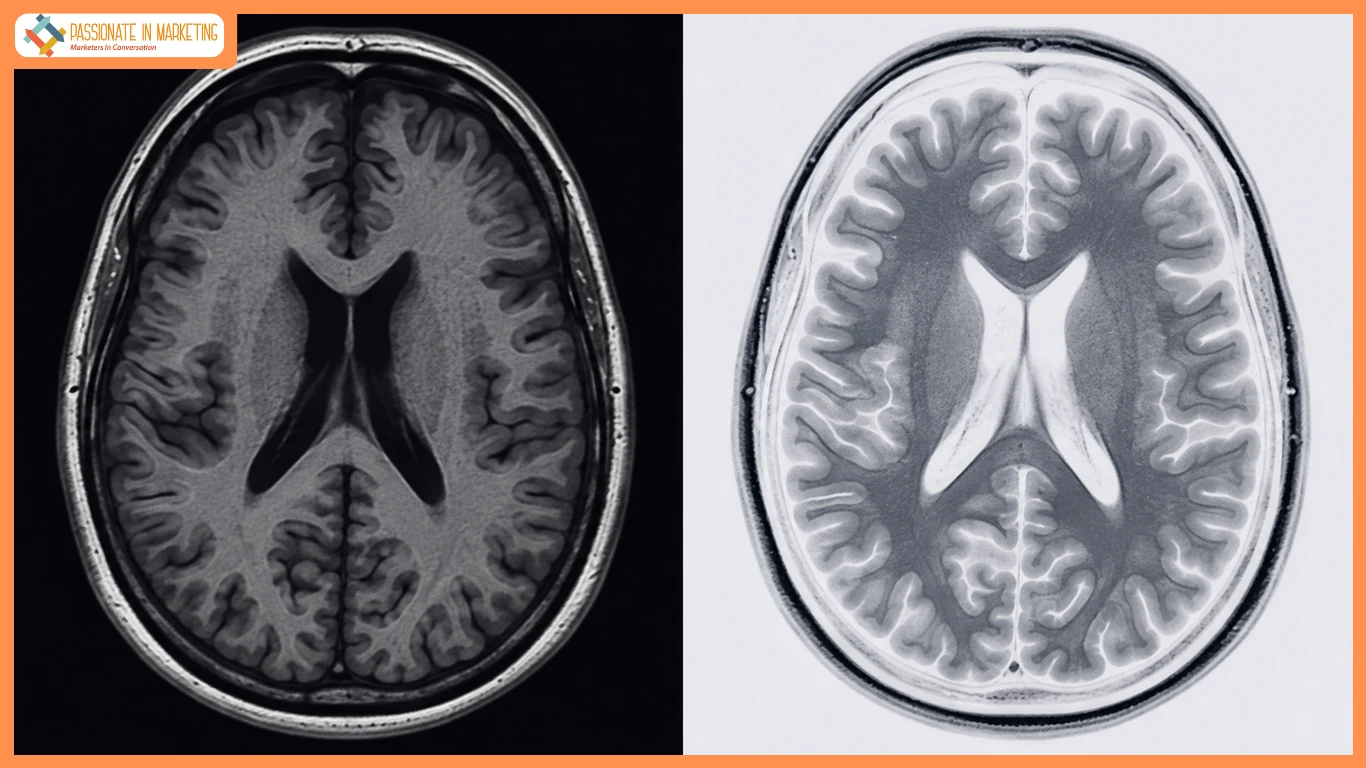
Digital color inversion applies 255 − RGB value to each pixel, turning black to white, white to black, and colors into their complements while preserving image structure..
2. Medical Imaging: Practical Applications of Negative and Inverted Modes
Medical Imaging
Image display affects how quickly and accurately physicians detect subtle pathology.
Why Negative Display Is Standard
Traditional X-rays showed bones white and lungs black, a convention retained by digital radiography.
Clinical Benefits of Inversion
Inversion can improve edge visibility, highlight subtle CT/MRI differences, and reduce glare and eye fatigue.
Practical Uses
- Fractures: Reveals faint cortical breaks.
- Micro-Calcifications: Sharpens small calcifications.
- Lesions: May improve visibility of subtle nodules or pleural thickening.
Disclaimer: Inversion is a visual aid only. Diagnosis requires licensed professionals and calibrated, diagnostic-grade systems.
3. Art and Graphic Design: Unleashing Inverted Visual Aesthetics
Artists and designers use inversion to create dramatic effects, while ImageInverter makes experimenting with inverted visuals quick and easy..Image InverterIt breaks visual monotony and adds high-contrast impact.
The Aesthetic Appeal of Negative-Style Imagery
Inversion disrupts familiar colors and reshapes how viewers perceive lighting, silhouettes, and forms.
- Cyberpunk: Creates neon blues, cyans, and purples.
- Vintage: Mimics retro film negatives.
- Visual Impact: Makes portraits instantly striking.
Design Uses
- Branding: Balances logos across light and dark designs.
- Photography: Creates dramatic effects.
- Digital Art: Adds a surreal feel.
Tips
- Reduce Saturation: Lower it 15–25% after inversion.
- Selective Inversion: Invert backgrounds for stronger separation.
- Blend Modes: Use Difference, Exclusion, or Color Dodge for richer textures.
4. Fast and Frictionless Image Inversion: Streamlining Your Workflow
For medical scans or design concepts, browser-based tools like ImageInverter provide fast, convenient inversion without heavy software.Image Inverter Just drag and drop an image into the browser for instant inversion.
Key Advantages
- No Installation: No software, plugins, or sign-ups.
- Privacy: Local processing keeps images off external servers.
- Format Support: Supports JPG, PNG, WebP, and BMP.
Who Benefits?
- Designers: Test mockups, logos, and color variations.
- Researchers: Invert biomedical images for study.
- Creators: Quickly make striking banners, covers, and thumbnails.
5. Frequently Asked Questions (FAQ)
FAQs
Does inversion affect medical image accuracy?
No. It changes display polarity, not pixel data or geometry. Diagnoses should still use approved software and calibrated monitors.
Inversion vs. hue adjustment?
Inversion reverses RGB values, while hue adjustment rotates colors without changing luminance.
Are online inversion tools safe?
Browser-based tools may process images locally, keeping files off external servers.
Can inversion be selective?
Yes. Use an inverted image with layer masking in a raster editor.
Summary
Color inversion supports both medical analysis and creative design by reversing contrast and color relationships. From highlighting subtle imaging details to creating bold visual effects, browser-based tools make inversion quick and accessible.
**The opinions expressed in the article are solely the author’s and don’t reflect the opinions or beliefs of the portal**

