

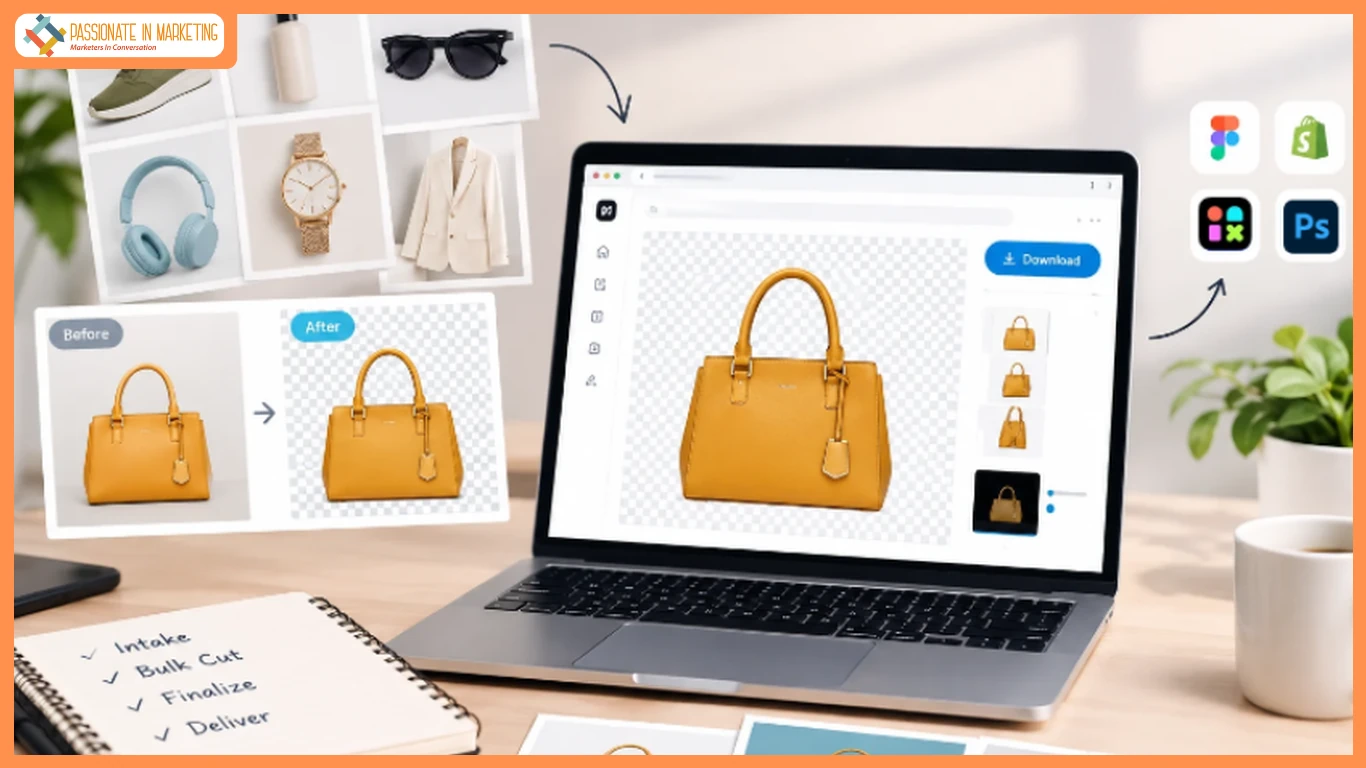
FAST delivery is part of agency work, but several urgent requests can throw off the schedule. A batch of 40 photos might be due by morning, and editing each one in Photoshop takes time.
That’s why remove.bg became a handy part of many agency workflows. It took care of the cutout, leaving designers free to work on the actual campaign or client deliverables. But from Dec 1, 2026, it is set to move fully into Canva.
That means background removal will require opening a Canva design for every image — which is fine for a one-off post, but it slows down batch work when all you need is a transparent file.
Agencies are looking for a remove.bg alternative that keeps the old simple flow: browser, drag, full-res preview, download PNG, no forced editor.
Designkit fits that criteria perfectly. No need to open a Canva file for every image. You get full-res, watermark-free transparent PNGs without any downscaling, ready to use in Figma, Shopify, Webflow, and Canva. That file-first approach is what lets agencies say yes to 4 pm requests without pulling senior designers off hero work.
Here is how good agencies are actually using it now.
The real reason agencies are done with desktop cutouts
Photoshop is excellent for detailed editing, but bulk background removal gets repetitive fast. One designer spends the afternoon cutting out products while the junior struggles with Select and Mask. By the end, the project folder has several versions of the same image, and the deadline hasn’t moved.
Plus the credit thing. When every cut costs a credit, your team starts doing mental math. “Should we cut this SKU now? Is it worth it?” That kills speed. The client doesn’t care about credits. The client cares that their Shopify collection is live tomorrow.
That is why a lot of studios switched to a browser-first SOP. They keep Photoshop, but only for the stuff that actually needs Photoshop. Everything else? Done in the browser in one go.
You need a remove.bg alternative that acts like the old remove.bg — go to page, drop files, get PNGs — but doesn’t punish you for volume.
The SOP that actually ships faster
Steal this. Most 10-20 person agencies run something close to it.
1. Intake – be ruthless about sorting
Make a folder template and force everyone to use it. No exceptions. /Client / Date / 01_RAW / 02_CUT / 03_FINAL / 04_DELIVERY
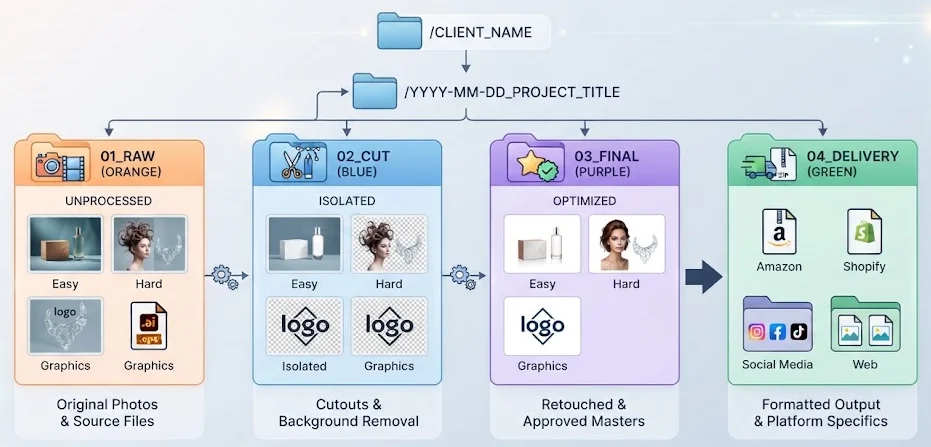
When files land, take 5 minutes and split them:
- A) Easy stuff – boxes, mugs, bottles, solid products. Clean edges.
- B) Hard stuff – hair, fur, mesh, see-through dresses, jewelry chains, clear perfume bottles.
- C) Graphics – logos, icons, badges that need to be transparent.
And rename right there. If you keep IMG_8843.jpg, you will pay for it later at 1 am trying to match it to a SKU. Rename to BRAND_SKU_angle.jpg immediately. Boring work, saves hours.
2. Bulk cut in browser, not in Photoshop
This is where the workflow changes.
Many agencies have realized Photoshop shouldn’t be the bulk tool. They do the creative work in Photoshop or Figma, but the 40, 80, 100 background cuts happen in the browser. For this, for years they used remove.bg.
Now the same job runs in Designkit. It’s a free remove.bg alternative that preserves the old file-first flow agencies relied on. The removal process is simple and straightforward.
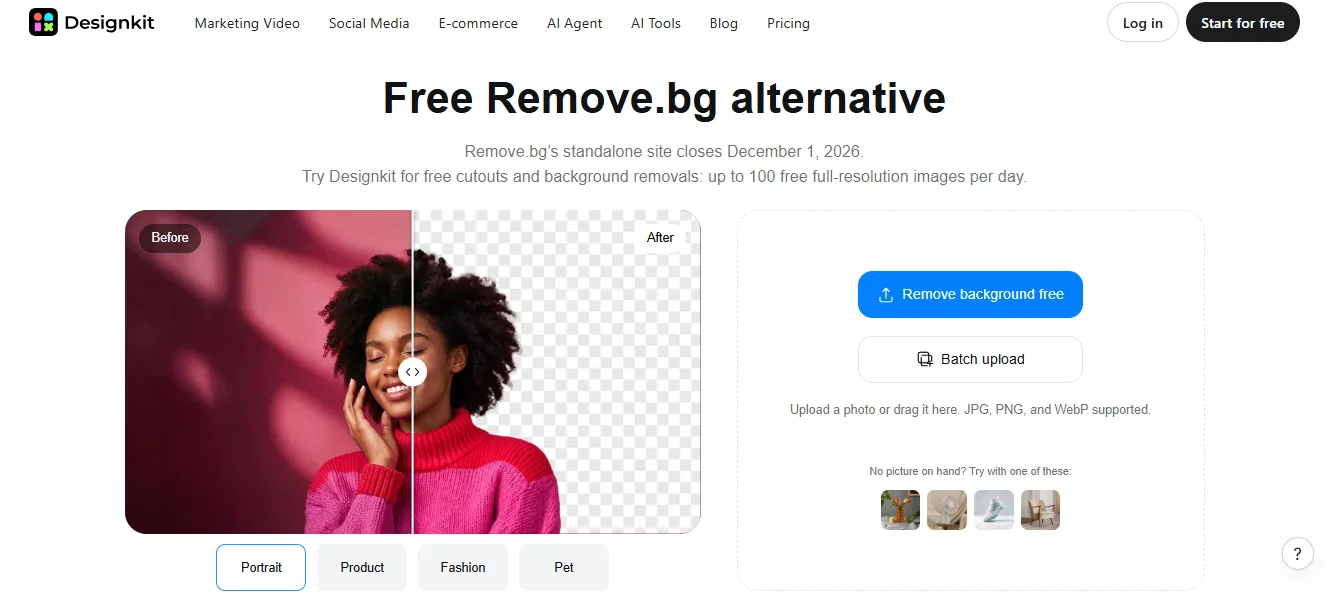
Open Designkit’s background remover — not a Canva file, just the remover page — and drop your A and C buckets together. 50 images? 80? Drop them. It doesn’t care if it’s a work laptop, a MacBook Air, or your VA’s old Windows machine. No install, no license.
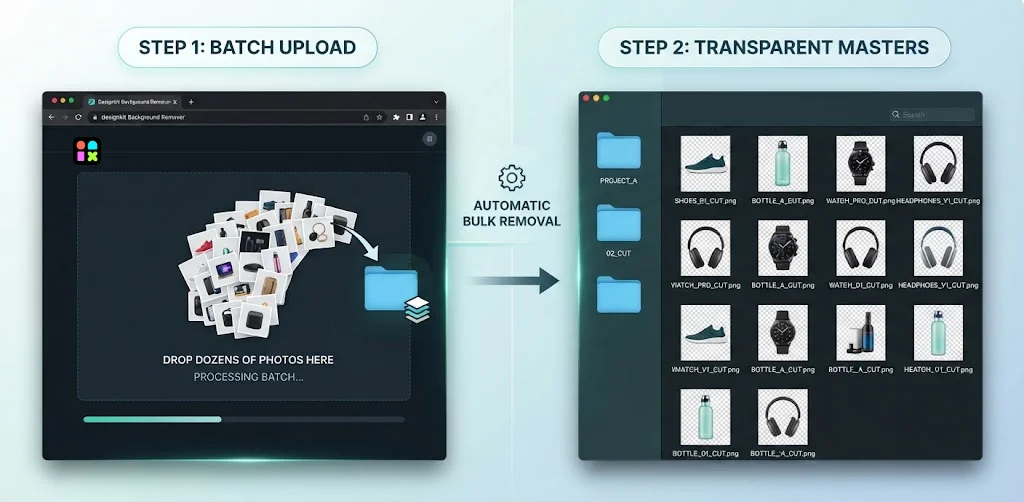
Why agencies prefer using Designkit more than the Canva or photoshop workflow:
- It gives you files, not designs. You upload, you get transparent PNG masters back. You can download the files directly without opening a design first.
- The original resolution stays intact, too. Upload a 3000px image, and you can download a 3000px PNG without a watermark on the full-resolution file.
- Hard edges stay hard. Logos don’t get that soft blur that makes a square icon look rounded.
And anyone can run it. Junior, intern, VA — they drag, they quickly check the preview on black (this is key. black shows the halo), they download. No need to teach Photoshop.
For bucket B, the hard stuff — same process, but do a quick 10-second check per image. Hair needs a little touch? Use the little refine brush in there instead of opening Photoshop. Still 10x faster.
Drop all those transparent PNGs into 02_CUT. That folder is gold. Keep it forever. Next month, the client says, “Can we put the same products on light grey for the new homepage?” You don’t re-cut. You just place the same PNG on grey. Done.
3. Don’t hand-cut the final white
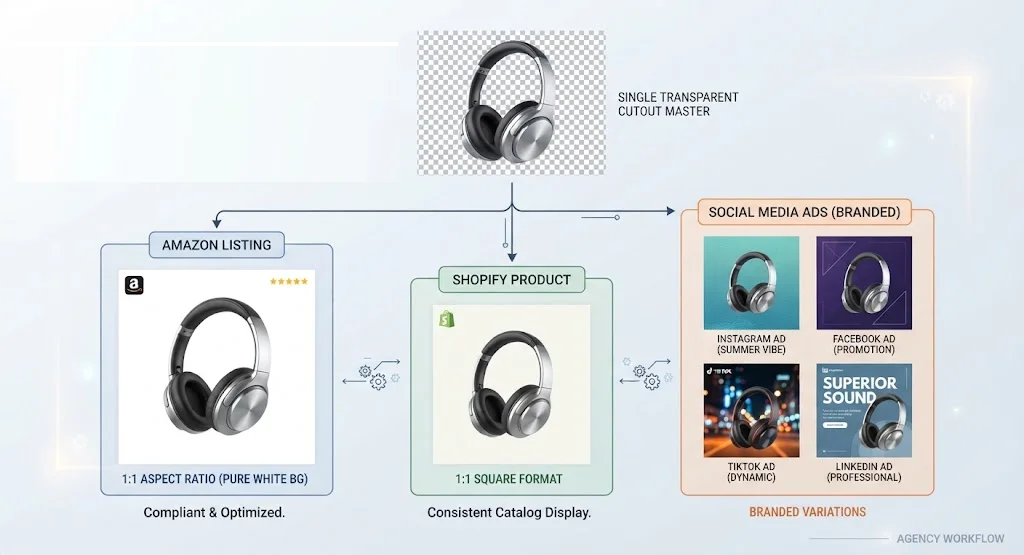
Stop placing each PNG on white manually. Build a template once. For
- Amazon: Set it to 2000 × 2000 px, pure white 255, product at roughly 85% of the frame. Export as JPEG at 90.
- Shopify: 2048 × 2048 px on white, and keep that transparent PNG from 02_CUT — that’s what you’ll use for collection banners and ad creatives.
- Ads: Same transparent file on brand colors. One good cutout, 10 ad versions in Figma in 10 minutes.
Quick note: These are just our preferred settings for this workflow, not official rules. Amazon and Shopify update their specs, and JPEG quality changes a bit depending on the tool.
4. Deliver like a pro
Don’t send a zip called images.zip with removed-bg-1 to removed-bg-147. Send folders with client naming. Clients notice organized delivery. They come back because of it.
When you SHOULD still use Photoshop
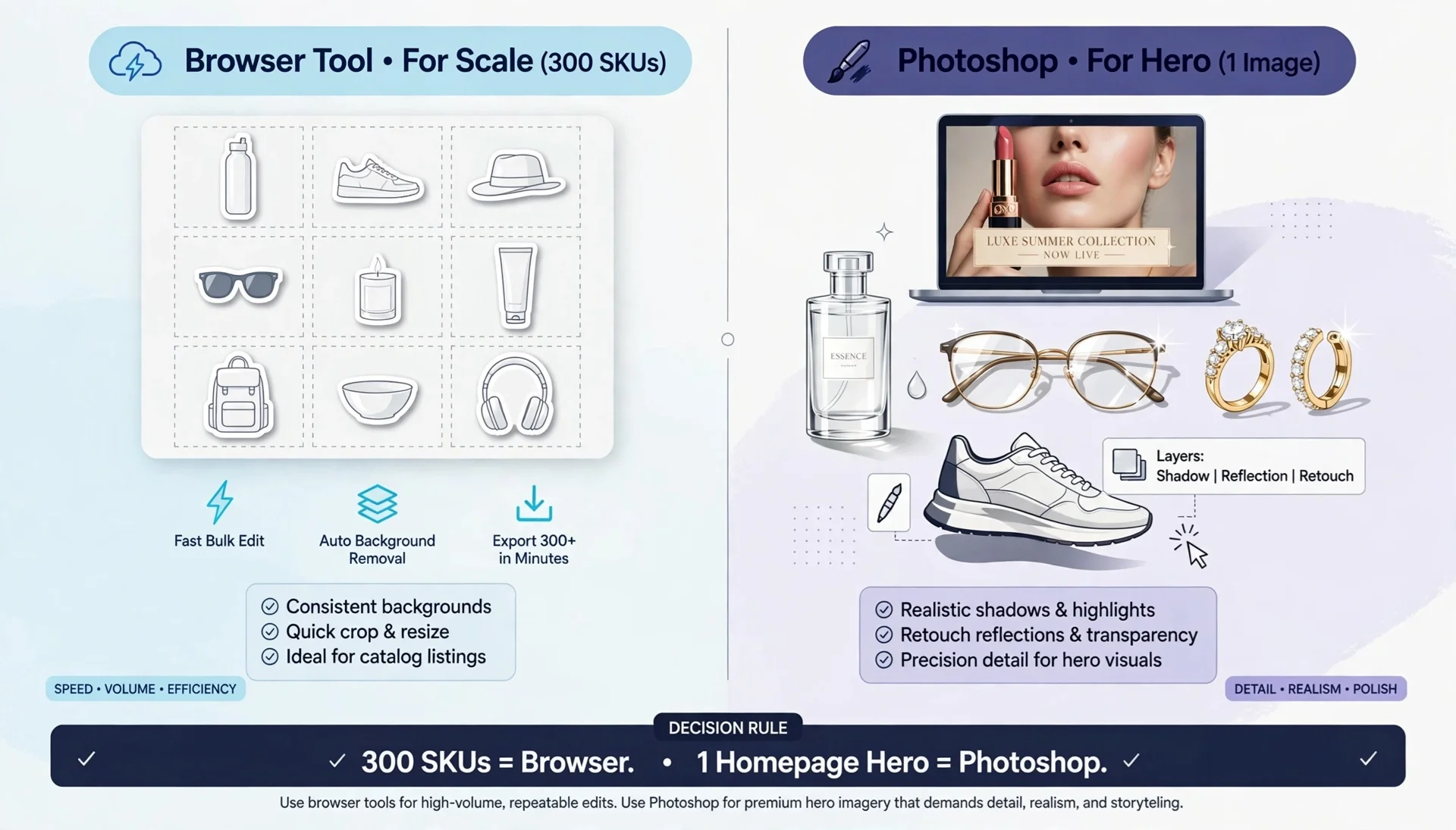
A good SOP knows when to say no to the browser tool.
Keep Photoshop for:
- Hero images. That one homepage banner that 100k people will see. Luxury beauty close-up. Fashion editorial. That one deserves an hour of manual retouching. The browser tool gets you 95% there, but the hero image deserves 100%.
- Weird transparency. Clear bottles with liquid, eyeglasses with glare, super reflective jewelry where you need to keep a natural shadow. Sometimes you need channels; you need manual paths.
- Custom shadows. If the client wants a realistic natural shadow rebuilt under a shoe, or a soft reflection under a bottle — that’s not removal, that’s retouching. Cut clean in Designkit first, then rebuild shadow in Photoshop.
Simple rule agencies use: 300 SKUs for a collection? Browser. One image that lives on homepage for a month? Photoshop. That balance is what keeps you profitable and sane.
Why this works for the business side
Clients don’t buy background removal. They buy speed.
If your team has to open a Canva design for every single image, check credits, worry about downscaling — you can’t promise same-day. But if your junior can just open a remove.bg alternative page and run 100 PNGs in 15 minutes, you can.
Clients don’t care what tool you used either. They care that 150 SKUs went live by morning. So, build the SOP once, enforce the intake folder, and make the “browser background remover” the default first step. Your turnarounds get faster, your team gets less burnt out, and you stop losing money doing $5 cutouts in $75/hour Photoshop time.
**The opinions expressed in the article are solely the author’s and don’t reflect the opinions or beliefs of the portal**

